Your plan.
Every set.
Visible progress.
From a planned exercise to a completed set and clear insights. Explore your whole workout journal.
Explore the appPush A
Machine Chest Press
Chest · Machine / other
Exercise note: 5–8
Focus on your next set.
Log weight and reps, keep previous results close and manage rest periods. Every completed set stays in your journal.
You do not have to recall your last workout from memory. Compare the previous result with today’s set, add a note and move on. Warm-ups and working sets each have their place, while the timer helps you track rest. If the gym has no signal, keep logging and sync when your connection returns.
- Working, warm-up, drop and failure sets
- Previous results, notes and rest timer
- Offline logging and sync when connected
Push A
Full Can
Completed · 2/2
Exercise note: 8–12
Your workout at hand. Even on the Lock Screen.
Your next set, values and rest time without returning to the full app. On the Lock Screen and in Dynamic Island.
Put your phone down and still see what comes next. Check the exercise, set number, weight and repetitions, then complete the set directly from the Lock Screen. During rest, add or remove 15 seconds or skip the break. Try the preview below to explore both widget states: a set ready to perform and a rest period in progress.
- Exercise, set, weight and reps
- Workout time and rest countdown
- Complete a set, adjust rest by ±15 s or skip it
An interactive Live Activity preview with sample data. Try the controls beside it.
Full Can
RestFind an exercise. Learn the movement.
A library with illustrations and instructions helps you find exercises for your plan. You can add your own too.
Choose exercises with a clear idea of what they involve. Each entry shows equipment and primary and secondary muscles; the illustration and instructions help you prepare for the movement. The same view gives access to the exercise’s charts and records. Display names in your app language or English, and add your own exercises alongside the catalog.
- Exercise names in your app language or English
- Illustrations, instructions and demonstration videos
- Your own exercises alongside the library
Barbell Bench Press
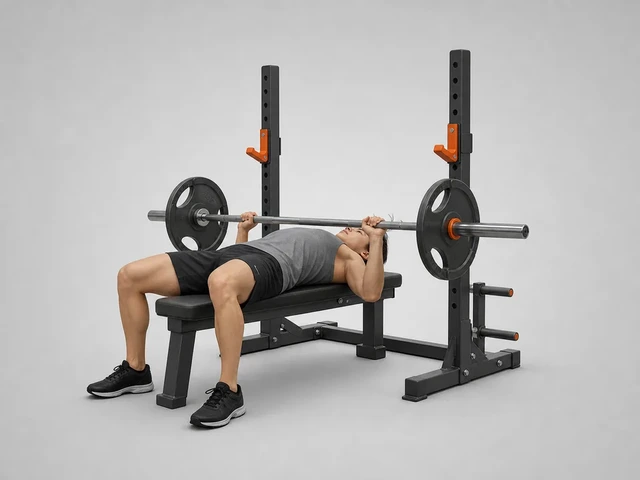
Chest
Barbell
Train with your own plan.
Build your own routine or use a starter plan. Change exercises, sets and their order. Folders keep things organized.
Your weekly schedule can change, and so can your plan. Save Push, Pull and Legs days or your own split, then arrange exercises, sets and their order. Keep related plans together in folders. Before starting, see the exercise and set counts and when you last used the plan, making it easier to choose today’s workout.
- Your own plans and folders
- Edit exercises, sets and their order
- Starter plans: Full Body, Upper/Lower, Push/Pull/Legs
Your plans
Demo · 6Push A
4 exercises · 12 sets
Last 06/08/2026
Push B
4 exercises · 12 sets
Not performed yet
Pull A
4 exercises · 12 sets
Last 06/10/2026
Pull B
4 exercises · 12 sets
Last 06/12/2026
Legs A
5 exercises · 15 sets
Last 06/14/2026
Legs B
5 exercises · 15 sets
Not performed yet
How much work did each muscle get?
See completed sets against an indicative range for your goal and experience. Expand a muscle to see each exercise’s contribution.
A total set count does not show how the work is distributed. Each muscle group gets its own result and an indicative range. The analysis includes completed working sets: primary muscles count in full and secondary muscles count by half. Warm-ups are excluded. Compare the distribution with recovery and progress rather than treating a range as a fixed prescription.
Sets by muscle group
Last 7 days · sets
Completed working sets: 24
Recommended 6–10 sets/week
Recommended 8–12 sets/week
Recommended 4–8 sets/week
Recommended 4–8 sets/week
Recommended 2–4 sets/week
Ranges are indicative.
Every result has a history.
Explore records and charts for a selected exercise over different periods. See the results behind the analysis.
Give each result context instead of looking only at the highest number. Select an exercise and period to compare estimated 1RM or heaviest weight with earlier workouts. Record history helps you revisit your best results, while the chart shows the path between them. Your logged sessions remain a reference for the next workout.
Incline Dumbbell Bench Press
Latest result: 59.5 kg
Data from 18 of 20 workouts.
What does my rhythm look like?
Workout history and your weekly goal in one place. See consistency alongside your results.
A few strong workouts are only part of the picture. The calendar helps you see how consistently you return and distinguishes full workouts from partial ones. Select a day to revisit the logged session. Your weekly goal sits alongside the history. This example has weeks with 3–4 workouts and three partial sessions in the month.
Training rhythm
Select a workout day to view it
14 workouts this month · 3 partial
Full workout: at least 80% of planned working sets, excluding warm-ups.
Everything around your training.
History and resume
Return to saved workouts and resume them.
Personal records
Follow your best exercise results.
Calculators
Calculate plates on the bar and warm-up sets.
Data export
Download CSV history or a full JSON export.
kg/lb units
Choose the units you train in.
Five languages
Polish, English, German, Spanish and French.
Good to know.
How are sets per muscle calculated?
Completed sets from finished workouts: primary ×1, supporting ×0.5. Warm-ups are excluded. One set can involve several muscles.
Are the ranges a personal training prescription?
No. They are indicative ranges based on your goal and experience. Adjust your volume to recovery and progress.
What works without internet?
After signing in and downloading your data, you can log workouts offline. Sync, first sign-in and videos need a connection.